들어가며
저번 시간에 우리는 아주 기초적인 LLM API 를 호출하고 간단하게 tool 을 활용하는 방법에 대해 배워보았습니다.
혹시나 어떤 내용인지 궁금하시다면 아래 링크를 클릭해주세요~!
https://huisam.tistory.com/entry/llm-api
LLM API 를 이용하여 Text 와 Tool 을 제공해보자(feat. OpenAi)
들어가며안녕하세요~! 저번 시간에는 우리가 LLM 의 기본 동작과 돌아가는 원리에 대해 살펴보았는데요오늘은 조금 더 실무 관점에서 어떤식으로 Frontier Model 을 사용할 수 있는지 설명해보려고
huisam.tistory.com
그런데 매번 tool 관련된 복잡한 python code 를 작성하는 것은 보일러플레이트 코드를 양산하고,
tool 이 많아질수록 코드는 더 복잡해지게 되겠죠
이번 게시글에서는 위와 같은 불편함을 해결하기 위해, 등장한 AI agent 라이브러리를 간단하게 알아볼게요.
수많은 AI agent 라이브러리들이 있지만, OpenAI model 을 사용할 것이라 Open AI agents 를 기반으로 한번 설명드려보겠습니다~!
AI Agent
본격적으로 들어가기 전에, AI agent 는 뭘까요? 도대체 우리는 무엇을 AI agent 라고 부르고 있을까요?
AI agent 에 정의는 시대에 따라 바뀌어왔지만, 개인적으로는 아래와 같이 AI agent 라고 정의하고 있습니다.
To archieve a goal using tools in a loop
도구를 반복적으로 사용하여 목표를 달성한다
즉, 어떤 tool(도구) 들을 통해 주어진 goal(목표)를 달성하기 위해 수행하는 것을 AI agent 라고 부릅니다.

단순 LLM(Large Language Model) 의 token 예측기에서 어떻게 능동적으로 자율적으로 판단하여 목표를 이루는 것일까요?
이는 LLM 의 next token 을 예측하는 방식은 그대로 사용하되, tool 을 주고받는 interface 를 통해 모든 것이 가능해졌습니다.
tool 의 description 을 적어줌으로써, 어떤 상황에서 어떤 tool 을 사용하여 어떤 결과를 얻을 것인지 예측하여 실행하게 되는 것이죠.
또한, 한번의 tool 을 사용하는 것이 아닌 여러개의 tool 이 있다면, 상황에 따라 반복적으로 tool 을 호출하여 목표를 달성하게 되는 것입니다.
OpenAI agents
OpenAI agents 는 OpenAI 에서 제공하는 agent 라이브러리입니다.
다양한 기능(Handoff, Guardrail, Agent as tool, Trace ..)들이 제공되지만, 앞으로 하나씩 상황에 맞게 소개해드릴 예정입니다 ㅎㅎ
오늘은 아주 기초적인 Agent 를 예시 코드와 함께 설명드릴게요
uv add openai-agents
openai-agents 라이브러리 의존성을 위 명령어를 통해 가져옵니다!
먼저, 이전에 Agent 라이브러리 없이 작성된 코드를 기억하시나요?
import os

from dotenv import load_dotenv
from openai import OpenAI
from openai.types import Reasoning

load_dotenv()
open_ai = OpenAI(api_key=os.getenv("OPENAI_API_KEY"))

tools = [
    {
        "type": "function",
        "name": "get_weather",
        "description": "Get current temperature for a given location.",
        "parameters": {
            "type": "object",
            "properties": {
                "location": {
                    "type": "string",
                    "description": "City and country e.g. Bogotá, Colombia",
                }
            },
            "required": ["location"],
            "additionalProperties": False,
        },
        "strict": True,
    },
]

response = open_ai.responses.create(
    model="gpt-5-nano",
    input="What is the weather like in Paris today?",
    tools=tools,
    reasoning=Reasoning(effort="minimal")
)
print(response.output[1].to_json())

def get_weather(location):
    # 실제 날씨 API 호출 (예시에서는 하드코딩)
    return f"The current temperature in {location} is 15°C with clear skies."

# Tool 호출 구현 (response API)
for item in response.output:
    if item.type == "function_call":
        if item.name == "get_weather":
            location = item.arguments
            # 실제 날씨 API 호출 (예시에서는 하드코딩)
            weather_info = get_weather(location)
            # 모델에 도구 호출 결과 제공
            follow_up_response = open_ai.responses.create(
                model="gpt-5-nano",
                input=f"The weather information for {location} is: {weather_info}",
                reasoning=Reasoning(effort="minimal")
            )
            print(follow_up_response.output_text)
위와 같이 tool 의 json schema 를 정의하고, tool 호출시에 python function 을 호출해주고, LLM 에게 전달하는 과정을 거쳤는데요.
OpenAI agents 를 사용하면 아래와 같이 간소화 됩니다
from agents import Agent, ModelSettings, Runner, function_tool
from dotenv import load_dotenv
from openai.types import Reasoning

load_dotenv()


@function_tool(docstring_style="google")
def get_weather(location: str) -> str:
    """Get current temperature for a given location.

    Args:
        location: City and country e.g. Bogotá, Colombia

    Returns:
        A concise weather sentence that includes Celsius temperature and a condition summary.
    """
    return f"The current temperature in {location} is 15°C with clear skies."


weather_search_agent = Agent(
    name="weather_search_agent",
    instructions="""
    You are a weather assistant. For weather-related requests,
    call the `get_weather` tool to get weather information and respond with a concise summary.
    """,
    model="gpt-5.4-nano",
    model_settings=ModelSettings(reasoning=Reasoning(effort="none")),
    tools=[get_weather],
)
어때요? 정말 간소화 되었죠?
OpenAI Agents 에 탑재되어 있는 function_tool decorator 를 사용해주기만 하면, Agent 에게 정의할 tool 을 지정할 수 있게 됩니다.
해당 decorator 를 통해 json schema 를 만들게 되고, LLM 은 이를 인지하여 tool 을 언제 사용해야 겠다 를 판단할 수 있게 되죠
그럼 정말 잘 작동하는지 검증해보러 가볼까요?
def main() -> None:
    query = "What is the weather in Seoul today?"
    result = Runner.run_sync(weather_search_agent, input=query)
    print(json.dumps(get_weather.params_json_schema, indent=2, ensure_ascii=False))
    print(result.final_output)


if __name__ == "__main__":
    main()
위와 같이 실행할 수 있는 코드와, 우리가 만든 tool 의 schema 를 확인할 수 있는 간단한 실행 코드를 작성해봅니다
그렇게 되면 json schema 는 아래와 같이 나옵니다
{
  "properties": {
    "location": {
      "description": "City and country e.g. Bogotá, Colombia",
      "title": "Location",
      "type": "string"
    }
  },
  "required": [
    "location"
  ],
  "title": "get_weather_args",
  "type": "object",
  "additionalProperties": false
}
Agents 라이브러리를 사용할 때와 거의 유사한 json 이 나오게 되죠?
이러한 보일러플레이트 코드를 쉽게 생성하기 위해 Agent 라이브러리들을 사용하는 것에 많은 이점에 있습니다.(부가적인 기능들도 포함해서)
Agent 호출은 어떻게 되었는지 OpenAI Platform 에서 쉽게 확인해볼 수 있습니다.
OpenAI platform 은 AI Engineer 들을 위한 페이지이고, Observability, Evaluation, Fine tuning, Billing 등 다양한 기능들이 있어요
OpenAI Platform
Explore developer resources, tutorials, API docs, and dynamic examples to get the most out of OpenAI's platform.
platform.openai.com
다만, 과금 요금제를 사용하고 있는 저만 확인할 수 있으니 어떤 내용인지 캡처로 공유해드릴게요 ㅎㅎ

agent 에 하나의 trace 로 묶인 것을 볼 수 있죠. 총 2번의 LLM API call 이 있었고, 1번의 tool 사용이 있었네요
순서대로 하나씩 설명드리겠습니다.
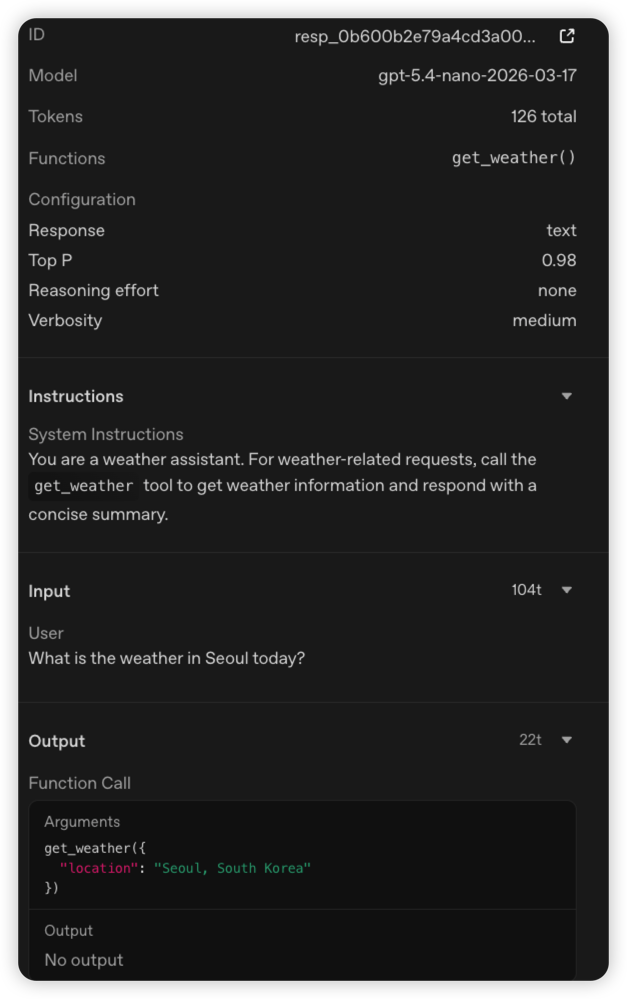
첫번째 llm call 은 사용자의 input 과 instructions 를 통해, output 을 도출해냈는데요.
output 이 get_weather 호출과 parameter(location) 을 어떻게 지정해서 전달할 것인지를 나타냈습니다.
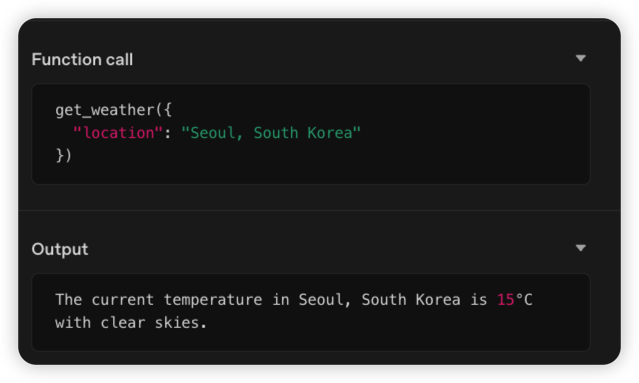
다음은 tool 호출인데요. local 에서 python code 를 실행하였고, 인자에 대한 결과값을 보여주고 있습니다.
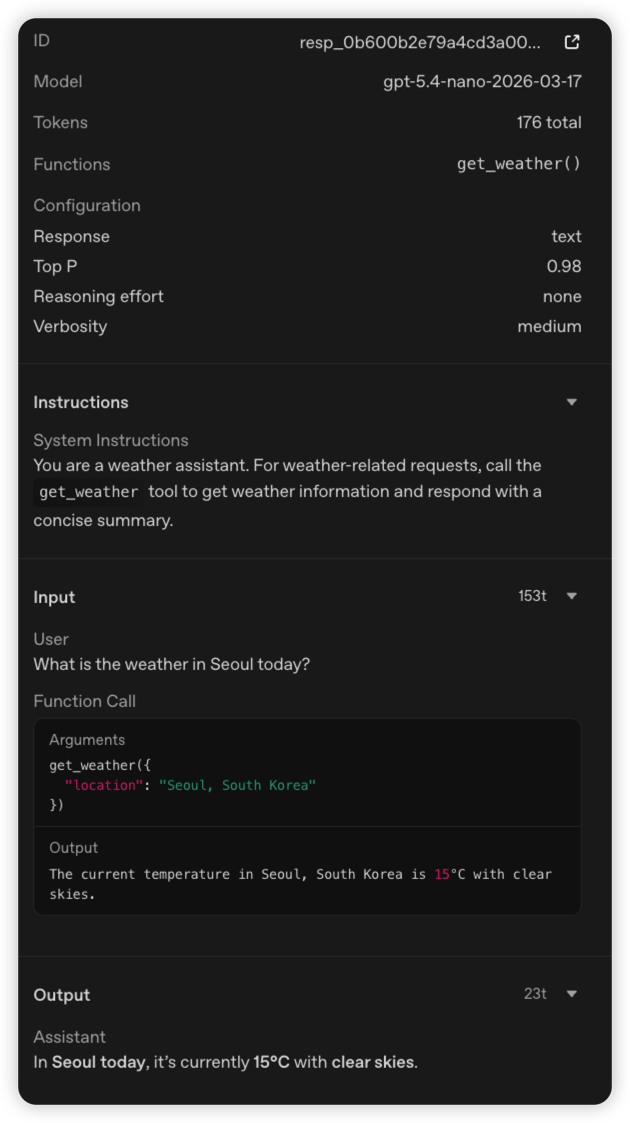
마지막으로 2번째 LLM API 호출인데요. tool 의 결과값을 LLM 에게 전달하여, 최종 output 을 이끌어내는 모습입니다
즉, 이렇게 해서 우리의 weather_search_agent 는 날씨를 가져오는 tool 을 통해 최종적인 목표(오늘 서울 날씨 뭐야?) 를 달성하게 되었네요
위에서는 간단한 예시로 설명드렸지만, 다양한 tool 을 제공하면 더 복잡하고 어려운 상황에서 많은 tool 호출이 이루어지고, 최종적인 목표를 달성하기 위한 과정(journey)를 거치게 되는 것입니다
정리하며
여러분들도 수작업으로 하고 있는 과정들을 개인화된 Agent 를 만들어 어떤 목표를 이루게 할 것인지 정의해보는 것도 좋겠네요.
Agent 에게 어떤 작업을 위임할 것이고, 어떤 Agent 라이브러리를 활용하여 목표를 달성하게 할 것인지 직접 구현해보고 실험해보면 좋겠습니다~!
다음 시간에는 조금 더 심화된 Agent pattern 을 통해서 어떤 상황에 어떤 pattern 를 사용하는게 적합할지에 대해 알아볼게요^^
참고
OpenAI Agents SDK
'Developer > AI' 카테고리의 다른 글
| LLM API 를 이용하여 Text 와 Tool 을 제공해보자(feat. OpenAi) (0) | 2026.02.15 |
|---|---|
| LLM 의 구조와 원리에 대해 쉽게 알아보자 (feat. llama) (0) | 2026.01.11 |